

Top 7 Segment LCD Screens: Features, Uses, and Buying Guide
2026-05-14
From digital clocks to industrial meters, 7-segment LCD screens are the quiet workhorses of modern electronics. If you're shopping for the right one, this guide breaks down the top picks, their standout features, and where they shine, with expert insights from Jingda-Display to help you make the smart choice.
Decoding the 7-Segment Interface: More Than Just Numbers
The classic seven-segment display often gets pigeonholed as a simple digit indicator, yet its rudimentary interface unlocks a surprisingly expressive visual vocabulary. Beyond the ten numerals, the same seven bars can be arranged to form a subset of letters, punctuation, and custom symbols through careful segment mapping. This versatility stems not from any hidden complexity, but from the deliberate simplification of its control lines—each segment corresponds directly to an input pin, allowing quick iteration of patterns without complex protocols or memory constraints. Engineers have long exploited this by blending numeric data with status cues like 'Err' or 'OFF' in embedded systems where adding a full alphanumeric screen would be overkill.
When interfacing with a microcontroller, the data flows as a parallel byte or through a serial shift register, but the real artistry lies in the translation layer between meaning and segment states. A hexadecimal digit like 'b' demands that the same vertical and horizontal elements take on a different personality compared to '6', and getting it right requires testing against human perception rather than just truth tables. Small optimizations—lowering the middle bar on a '1' to avoid confusion with an 'I', or tweaking the slant on a ‘C’—turn the rigid grid into a legible character. This design nuance often gets tucked into lookup tables that bear little resemblance to standard ASCII, forcing developers to keep a mental map of which segments illuminate for which context.
Driving the interface also reveals its dual nature: it’s simultaneously a bare-bones hardware connection and a canvas for creative encoding. Multiplexing techniques make it possible to manage dozens of displays with just a few pins, yet the timing demands shift from static logic to precise refresh rates to prevent flicker. When combined with sensors, the display transforms into a real-time feedback loop—showing not just a value, but a trend through scrolling segments on a single digit. The same interface that started as a simple numeric output quietly evolves into a compact, ambiguous-signal decoder that blurs the line between data display and minimalistic art.
Size and Visibility: Choosing What Fits Your Space
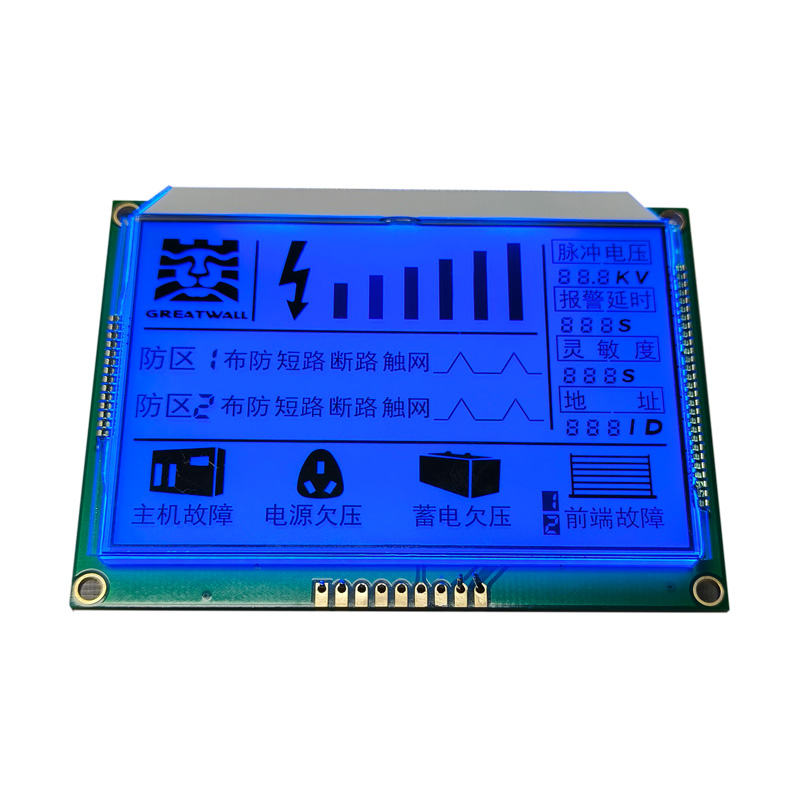
When a sign is too small, it fades into the background, no matter how striking the design. People walk past without noticing, or they squint and give up. The opposite problem is just as common: an oversized piece overwhelms the area, making everything else feel cramped. It’s not about filling every inch but finding a dimension that holds attention without shouting.
Think about where viewers will stand most often. A lobby sign seen from twenty feet away needs lettering tall enough to read without strain, while a directional placard in a hallway can be much smaller because people encounter it up close. The same rule applies to outdoor displays, where distance and movement shrink the apparent size. A good starting point is to measure the farthest viewing point and then test a rough mockup in the actual environment—even a paper template can reveal whether the scale feels natural.
Beyond pure measurement, the character of the space matters. A minimalist room benefits from a single modest sign that complements rather than competes with the architecture. In a busy retail setting, you might need multiple smaller signs working together to guide the eye without blocking sightlines. The goal is a kind of visual rhythm: the sign claims its place without disrupting the flow, becoming part of the space instead of a layer on top.
Power Profiles: Matching Screens to Battery Constraints
Modern devices juggle a constant tug-of-war between vivid displays and finite battery reserves. The screen, often the hungriest component, can drain a fully charged phone in hours if left unchecked. Rather than applying a one-size-fits-all brightness or refresh rate, systems now rely on finely tuned power profiles that adapt in real time. These profiles don't just dim the panel; they orchestrate a delicate balance of resolution scaling, color depth adjustments, and even selective frame pacing to stretch every last watt without making the experience feel compromised.
Under the hood, a power profile acts like a translator between user activity and hardware capability. When you're scrolling through a static article, the screen might drop to 10Hz, barely sipping energy, yet snap back to 120Hz the moment your finger flicks. Gaming scenarios push this further, dynamically tweaking touch sampling rates and GPU rendering loads to maintain smooth motion while clamping power draw to a predefined thermal ceiling. The magic lies in how seamlessly these shifts happen—often imperceptibly—letting the device ride the edge of its battery curve without ever making the user consciously trade off visuals for longevity.
From Kitchens to Cockpits: Unexpected Use Cases
When most people imagine advanced technology finding its footing, they picture sterile labs or sprawling data centers. Yet some of the most fascinating applications have slipped quietly into the messier, more human corners of everyday life. Take the modern kitchen, where computer vision once reserved for manufacturing lines now peers into refrigerators, tracking freshness and suggesting recipes based on what’s actually on the shelves. It’s a far cry from the factory floor, but the leap makes a strange kind of sense.
Then there’s the cockpit of a commercial airliner, where predictive algorithms born in financial trading help pilots navigate turbulence before it strikes. Weather data streams in from dozens of sensors, and within milliseconds, the system suggests an altitude tweak that saves fuel and soothes jangled nerves. No one would confuse a stock ticker with a flight deck, but the underlying logic is remarkably similar: spot the pattern, make the call, and do it faster than any human can.
Perhaps the most unexpected crossover, though, lives in the world of precision agriculture. Drones originally designed for search-and-rescue now hover over vineyards, using multispectral imaging to diagnose grape stress down to the individual vine. A vintner in Tuscany can adjust irrigation row by row, guided by the same tech that once scanned disaster sites for survivors. It’s a quiet revolution, stitching together domains that never imagined they’d share a toolbox.
Durability Demands: Weathering Real-World Abuse
When we talk about gear built to last, we're not just tossing around marketing fluff. Real durability means surviving drops onto concrete, being crammed into overstuffed bags, and enduring the relentless grind of daily commutes. It’s about resisting scratches, dents, and the kind of wear that turns shiny new tools into battered veterans before their time. The true test comes not in a lab, but in the chaos of everyday life.
Take a moment to consider the silent killers: fine dust clogging ports, moisture seeping into seams, and the slow fatigue from constant vibration. A device that can't handle a sudden rain shower or a sandy beach day fails at the most basic level. Effective durability engineering pairs rugged materials with thoughtful sealing—stuff that keeps the elements out without turning the product into a brick. It's a balance of toughness and usability that separates the truly robust from the merely sturdy.
Beyond the physical abuse, there's the mental load of worrying if your gear will survive a clumsy moment. When a case is designed with shock-absorbent corners and reinforced frames, it buys you peace of mind. That accidental tug off the desk or the frantic scramble through airport security becomes a non-event. At its core, real-world abuse demands resilience that goes beyond spec sheets—it’s about creating products that fade into the background of your adventures, reliable and unshakeable.
Sourcing Smarter: Avoiding Common Purchase Pitfalls
Every seasoned buyer knows the sting of a deal gone wrong—the sample that dazzled but the bulk order that disappointed. It's a quiet trap that catches even the cautious: assuming a supplier's first impression always holds up. Smart sourcing starts with layered verification. Request a pre-production sample before the full run; it's your cheapest insurance against costly surprises. And don't stop there. Unannounced inline inspections during manufacturing catch drift early, not after pallets are sealed. The real pitfall is trust without checkpoints—build a timeline that includes these, and your margins will thank you.
Payment terms often feel like a tug-of-war between trust and control, and too many buyers give up leverage without realising it. Sending a large deposit upfront might fast-track the order, but it also shifts all the risk onto your ledger. Seasoned purchasers structure payments around milestones: a modest deposit to begin, a tranche after a successful quality check, and the balance only when goods are verified at origin—or even on your home turf. It's not about suspicion; it's about keeping your business solvent when a supplier hits turbulence. A partner who pushes back hard on fair terms is one worth walking away from.
Spec sheets gather dust while assumptions run riot—that's the quiet background hum of most sourcing disasters. A purchase order that says "heavy duty" or "industrial grade" without metric-backed specifics is an invitation for substitution. Clarity isn't just about drawings; it's about tolerances, material grades, and agreed testing methods. Smart buyers create a living tech pack that evolves with every order, capturing what worked and what failed. When a supplier knows you measure, they stop guessing—and that's when consistency stops being a pleasant surprise and starts being the norm.
FAQ
Segment LCDs are those classic numeric or alphanumeric readouts you see on calculators, digital clocks, and home appliances. Unlike graphic LCDs that can display images or complex interfaces, these are built with predefined segments that light up to form numbers, letters, or simple icons. They sip power and remain crisp even in direct sunlight, which is why they’re still everywhere in battery-operated devices.
We focused on availability, interface friendliness, contrast, and versatility. Standouts include the evergreen HD44780-compatible 16x2 character module—a maker’s best friend—alongside ultra-low-power custom segments from brands like Varitronix for embedded projects. The list also tips its hat to automotive-grade panels with wide temperature tolerance, and several budget COG (chip-on-glass) options that pack a lot of segments into a tiny footprint.
Start with the interface: parallel, I2C, SPI—make sure it works with your microcontroller. Then look at the viewing angle and contrast ratio; if the display washes out from the side, it’s a pass. Duty cycle and bias tell you how crisp the segments will look. Don’t ignore the operating temperature range if you’re building something that lives outdoors. Finally, check if you need a custom glass silhouette or if an off-the-shelf 14-segment or 16-segment module can handle the alphanumeric mix.
Their party trick is simplicity and ultra-low power. You’ll spot them in medical gadgets like glucose meters, industrial panel meters, and thermostat readouts. E-bike displays and coffee machine interfaces also rely on them because they’re ridiculously readable in bright light. One niche: retrofitted smart home controllers—people love the vintage-yet-functional vibe a custom segment LCD brings to a project.
If pin count doesn’t scare you and power is paramount, static drive is fantastic—one pin per segment gives the sharpest image with zero flicker. But when you’re short on I/O, multiplexing saves the day. Duplex or triplex designs use fewer pins but demand more from your driver and can introduce ghosting if you cheap out on the glass. Most modern microcontrollers have built-in LCD drivers, so multiplexed panels are the pragmatic choice for anything beyond a 4-digit counter.
For one-offs, probably not—the tooling charge can sting. But if you’re making even a few dozen units, the per-unit cost drops quickly and you get exactly the icon set and layout your product deserves. Some Chinese suppliers offer low-cost prototype runs where you can get 10 custom panels for under $100 total, mold included. For hobbyists, rethinking a standard 7-segment or alphanumeric module often does the trick without the upfront pain.
The biasing network and the display’s actual threshold voltage. If you drive it with the wrong voltage or a poor resistor ladder, segments bleed or look dim. People also forget about the bezel and mounting—clips, zebra strips, or heat-staked pins matter a lot for production. And for battery gear, check the supply current with all segments lit; some designs sip single-digit microamps, others gulp a milliamp because of built-in backlight LED drivers you might not even need.
Conclusion
Seven-segment LCD screens often get pigeonholed as simple number displays, but a closer look reveals far more flexibility. Beyond the classic digit pattern, clever multiplexing and custom icons let them indicate status, units, or battery levels without draining precious power. That efficiency is critical for battery-operated devices—a well-chosen segment LCD can run for years on a coin cell. When you’re picking one, physical size and viewing angle matter just as much as electrical specs. A display that’s crisp indoors might wash out under direct sunlight, so matching the glass type and polarizer to your installation environment saves a lot of frustration later.
These screens show up in places you’d never expect: inside espresso machines that survive daily steam, on motorcycle dashboards bouncing through rain, and in medical tools that demand flawless readability. Such real-world abuse calls for extended temperature ranges and rugged construction—something a datasheet often understates. The buying process itself can trip the unwary; overlooking connector pitch, minimum order quantities, or the need for a factory-installed bezel can derail a project fast. Building a small stock of samples from different vendors and testing under your actual operating conditions is the smartest move you can make. That upfront legwork pays off in a display that keeps going when everything around it breaks.
Contact Us
Contact Person: Vincent
Email: [email protected]
Tel/WhatsApp: 86 135 5485 1379
Website: https://www.jda-display.com/